YouScrollChrome extension · YouTube
← Selected work

FreeNo account · No analytics · No remote code

YouScroll /Pinned comments for YouTube

Keep watching.Keep exploring.

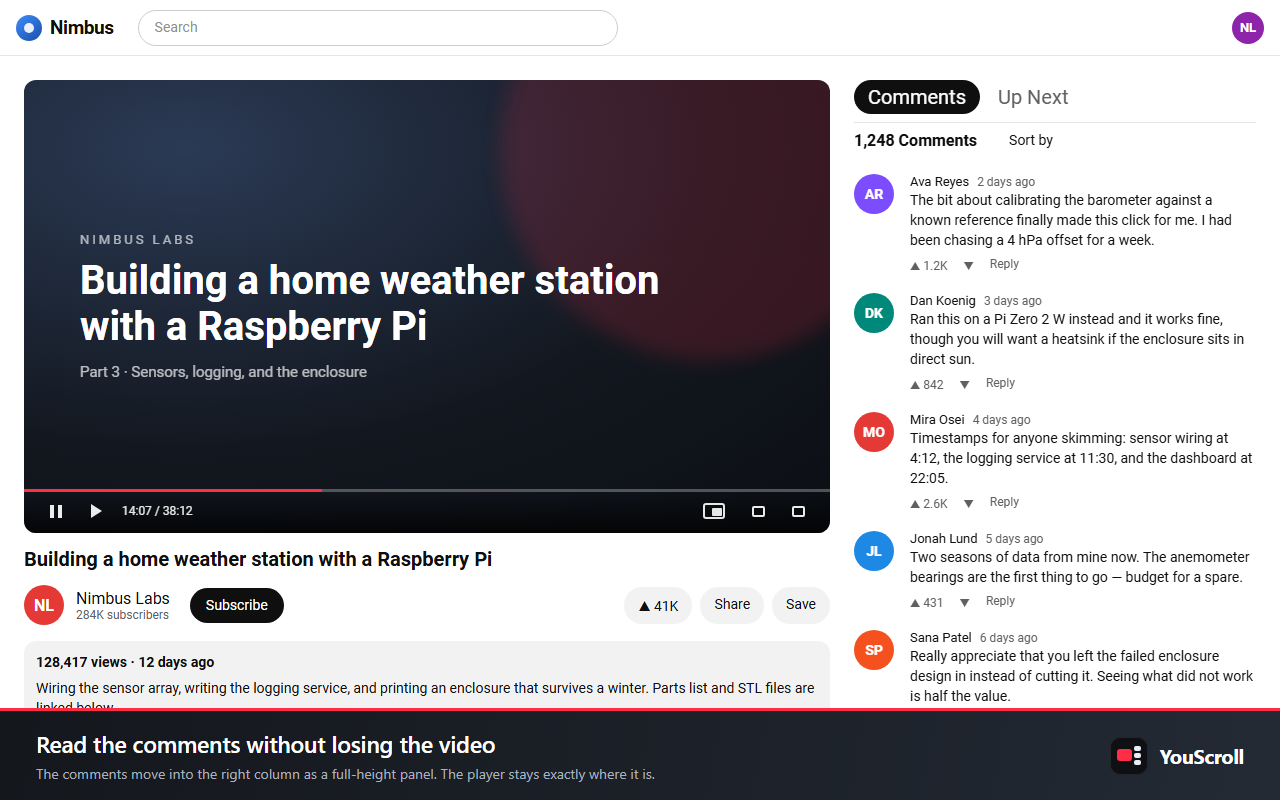
On YouTube, reading the comments pushes the video off the top of the screen. YouScroll moves the comments into the right-hand column as a full-height panel that scrolls on its own, and leaves the player where it is.

YouScroll store illustration: an independent comments panel with Comments and Up Next tabs beside the video.
One small change. A better flow.Supplied preview

Runs on youtube.com and nowhere else

Scroll

Watch ↔ Read ↔ Browse

01 /Deliberately narrow

One small change.A better flow.

YouScroll changes the layout of the YouTube watch page and nothing else. Local-first, with no developer-operated server.

Site it runs on
1
www.youtube.com — no other sites, tabs or history
Tabs in the panel
2
Comments and Up Next, your choice first
Settings object stored
1
Which features are on, which tab opens
Network requests of its own
0
No analytics, advertising SDK or remote code

02 /Inside YouScroll

The video stays.The page moves around it.

Comments panel01 / 03

Comments get their own column.

Read without losing the video.

The comments move into the right-hand column as a sticky, full-height pane that scrolls independently of the page. YouTube’s own lazy loading keeps working inside it: scroll to the bottom and the next page of comments loads exactly as it normally would.

  • Sticky, full-height panel
  • Scrolls independently of the page
  • YouTube’s own loading, untouched
A watch page with the comments pinned in a full-height panel beside the video.
Comments · Up Next02 / 03

One tab apart.

Moved, not replaced.

Switch between Comments and Up Next with a tab bar, so the recommendations are moved rather than replaced, and choose which one opens first.

  • Comments and Up Next in one panel
  • Pick the tab that opens first
Picture-in-Picture03 / 03

Pop the video out.

Float it above everything.

Pop the video out into your browser’s Picture-in-Picture window from a button in YouTube’s own control bar, so it floats above your other applications.

  • Toggle either feature from the toolbar popup
  • Takes effect in open tabs, without a reload

03 /Where it runs

One site.One settings object.

No YouScroll account, analytics service, advertising SDK or developer-operated server. The build fails if a host pattern ever escapes www.youtube.com.

Local-first, deliberately narrow.

The extension makes no network requests of its own and contains no remote code. The only thing it stores is a small settings object: which features are switched on, and which tab the panel opens on.

The panel and the pop-out button are ordinary elements in the page, so scripts running on that page can see them, exactly as they can see the rest of the page.

Read the privacy policy
Host access
https://www.youtube.com/* only — to move YouTube’s own comments and recommendations into the panel, and put them back when a feature is switched off.
Storage
chrome.storage.sync holds one settings object. If you are signed into Chrome, it syncs between your own browsers through Chrome’s own sync.
Not used
No background service worker, no tabs or scripting permission, and no optional permissions.

04 /Good manners

It steps aside, on purpose.

Every change YouScroll makes carries its own undo. Switch a feature off and YouTube’s layout returns exactly as it was.

01

Theater mode and fullscreen

YouTube reflows into one wide column, so the panel stands down. Press T or leave fullscreen and it comes back.

02

Narrow windows

Below YouTube’s own two-column breakpoint you get stock YouTube instead of a half-applied layout. Widen the window past roughly 1020 pixels.

03

No comments to pin

Videos with comments disabled, and live streams, which show a chat panel instead of comments.

06 /Get YouScroll

Free on the Chrome Web Store

Keep the videoin view.

Add it to Chrome and open any YouTube video. Questions, privacy requests and support: codecube99@gmail.com

Next product · DESIGN ENGINEERINGPixelGhost — Small details. Better page reviews.