
PixelGhostChrome extension · v3.0
← Selected work

FreeNo account · No paid tier · No trial

PixelGhost /Pixel-perfect design overlay, screenshots & visual QA

Small details.Better pagereviews.

PixelGhost brings visual comparison, screenshots and page inspection into one free browser toolkit. Place your mockup over the live page to spot differences in spacing, color and alignment.

The PixelGhost ghost holding a magnifying glass over two overlapping interface cards.
Your design. On the real page.Store artwork

Show or hide the widgetAltShiftG

Scroll

Compare ↔ Capture ↔ Inspect

01 /One toolkit

Everything a review needs.Right where you work.

Compare, capture and inspect without leaving the page. Page tools work even without a reference. One extension. Every feature free.

On-page tools
5
Layers, Screenshot, Color Picker, Page Ruler, Inspector
Side-panel tools
5
Assets, Vision, SEO, Stack, Element Selector
Devices side by side
6
Rotate, sync scrolling, save screenshots or video
Interface languages
8
Light or dark mode, five accent colors
Accounts or paid tiers
0
No PixelGhost analytics, ads or tracking

02 /Inside PixelGhost

Six ways to lookcloser.

How to use every tool
Layers01 / 06

Compare with precision.

Your design. On the real page.

Add reference images from files, folders, your clipboard or an HTTPS link. Work with multiple layers, adjust position, scale and rotation, then use opacity and blend modes to reveal mismatches.

  • Files, folders, clipboard or an HTTPS link
  • Multiple layers, autosaved for each page
  • Position, scale and rotation
  • Opacity and blend modes

Hold\to hide the reference · Arrows nudge 1px
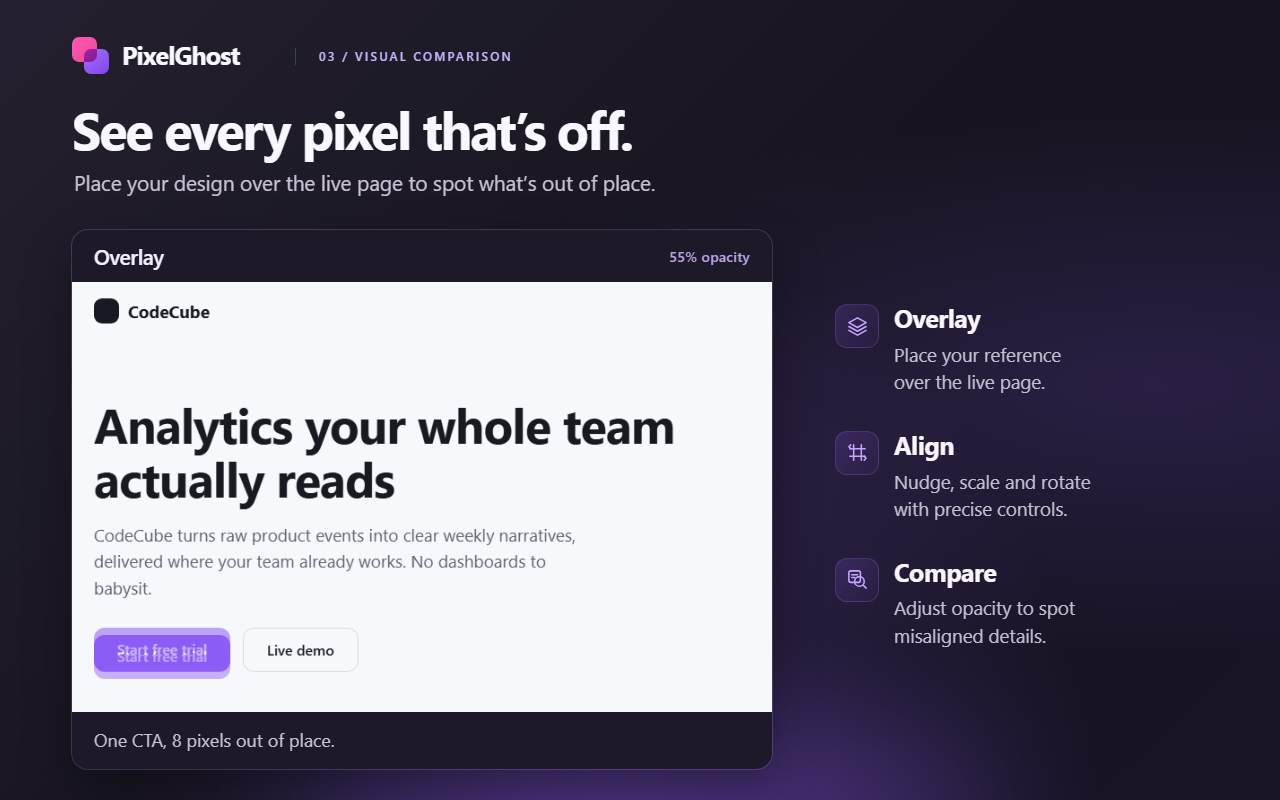
PixelGhost overlay at 55% opacity revealing a call-to-action button 8 pixels out of place.
Screenshot · Editor · Steps02 / 06

Capture the details.

Mark it up. Walk it through.

Screenshot a full page, visible area or element. Add arrows, notes, highlights and blur, or crop in the editor. Combine captures into a Steps walkthrough and save or copy the finished picture.

  • Full page, visible area, an area or one element
  • Numbered notes, arrows, boxes, text, highlights, blur, crop
  • Steps across pages and tabs, finished as one picture
  • Recent keeps your last twelve, on your device

PixelGhost hides its own widget before every capture

Color · Ruler · Inspector03 / 06

Work right on the page.

No detour through DevTools.

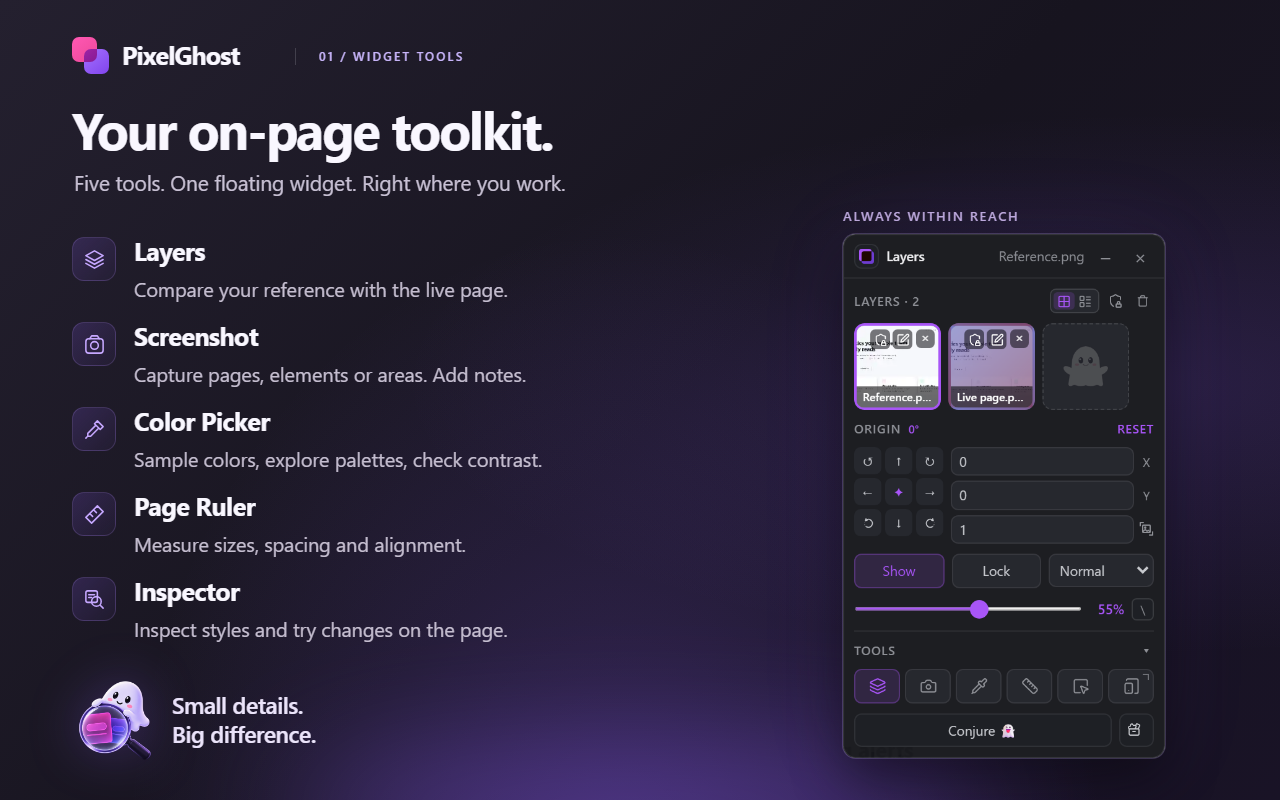
Color Picker
Sample colors, explore page palettes and check contrast.
Page Ruler
Measure elements, spacing and alignment.
Inspector
Read computed styles, inspect the box model and try temporary CSS or font changes.

AltShiftCstarts the screen eyedropper

The PixelGhost floating widget beside its five on-page tools: Layers, Screenshot, Color Picker, Page Ruler and Inspector.
Device Simulator04 / 06

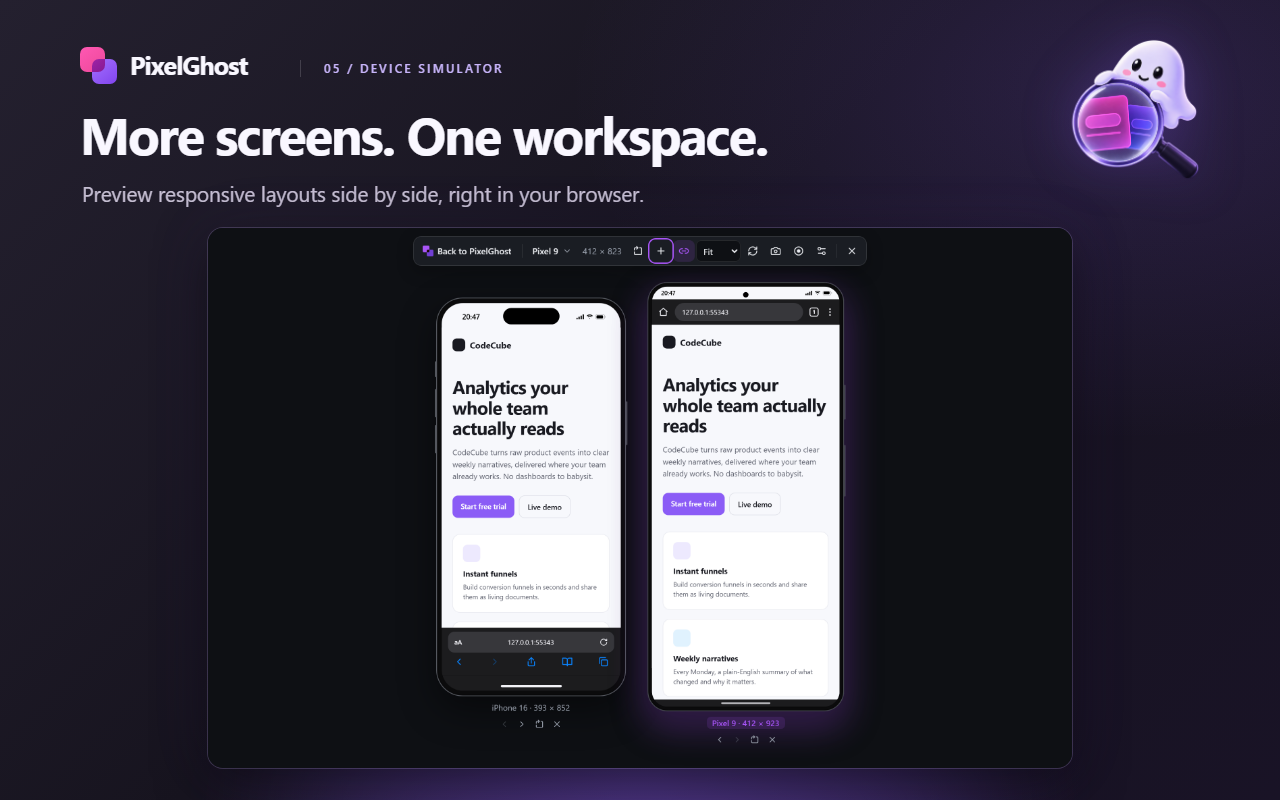
Preview more screens.

More screens. One workspace.

Compare up to six device frames side by side. Rotate, sync scrolling and save screenshots or video. Pick phones, foldables, tablets or laptops — or build your own device.

Runs in your desktop browser · Not a replacement for real-device testing

The Device Simulator previewing the same page on an iPhone 16 and a Pixel 9 side by side.
DevTools side panel05 / 06

Look beneath the design.

Understand the whole page.

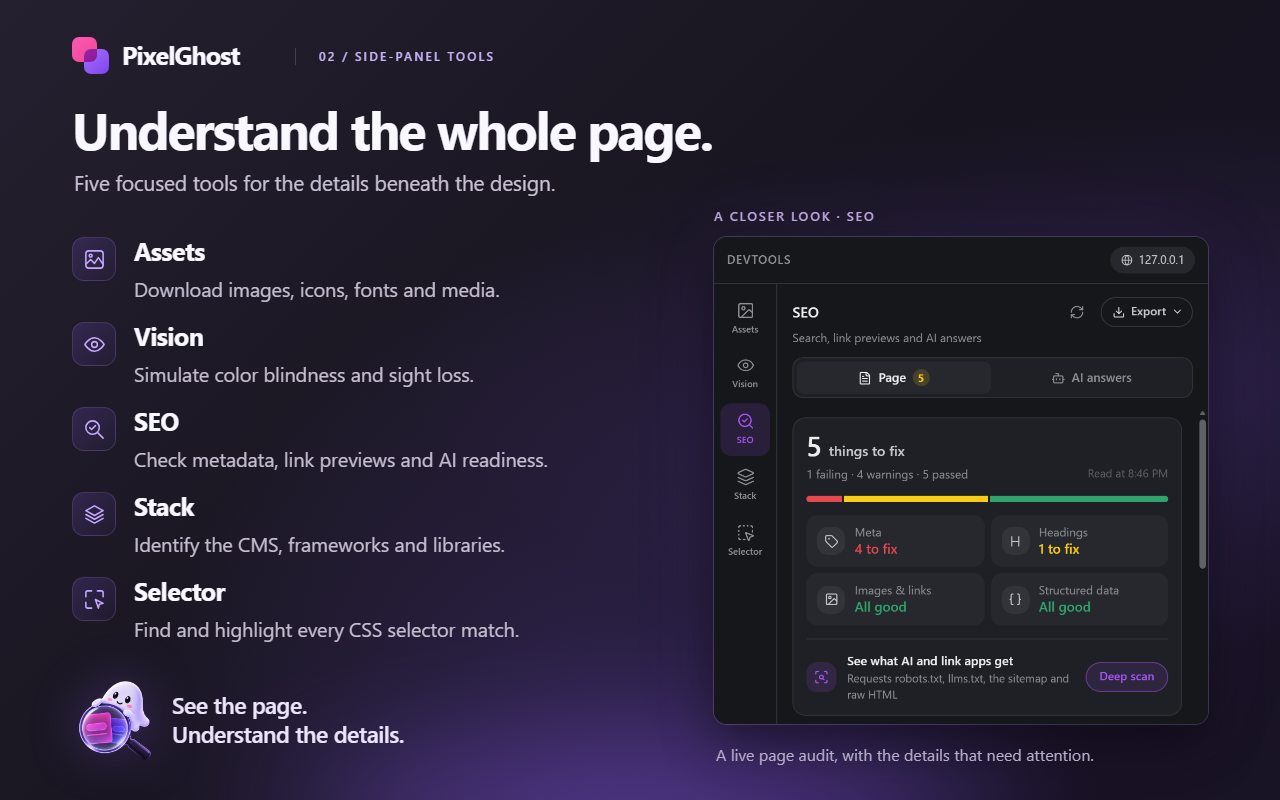
Assets
Find and save images, icons, fonts and media.
Vision
Preview color-vision and sight-loss effects.
SEO
Review metadata, headings, links, structured data and search/share previews. Run the separate AI answers Deep scan for answer-engine readiness.
Stack
Detect frameworks, CMS platforms and libraries from page signals.
Element Selector
Find, highlight and export CSS selector matches.
The DevTools side panel's SEO audit listing things to fix across meta tags, headings, images and structured data.
Projects & history06 / 06

Pick up where you left off.

Ready for your next review.

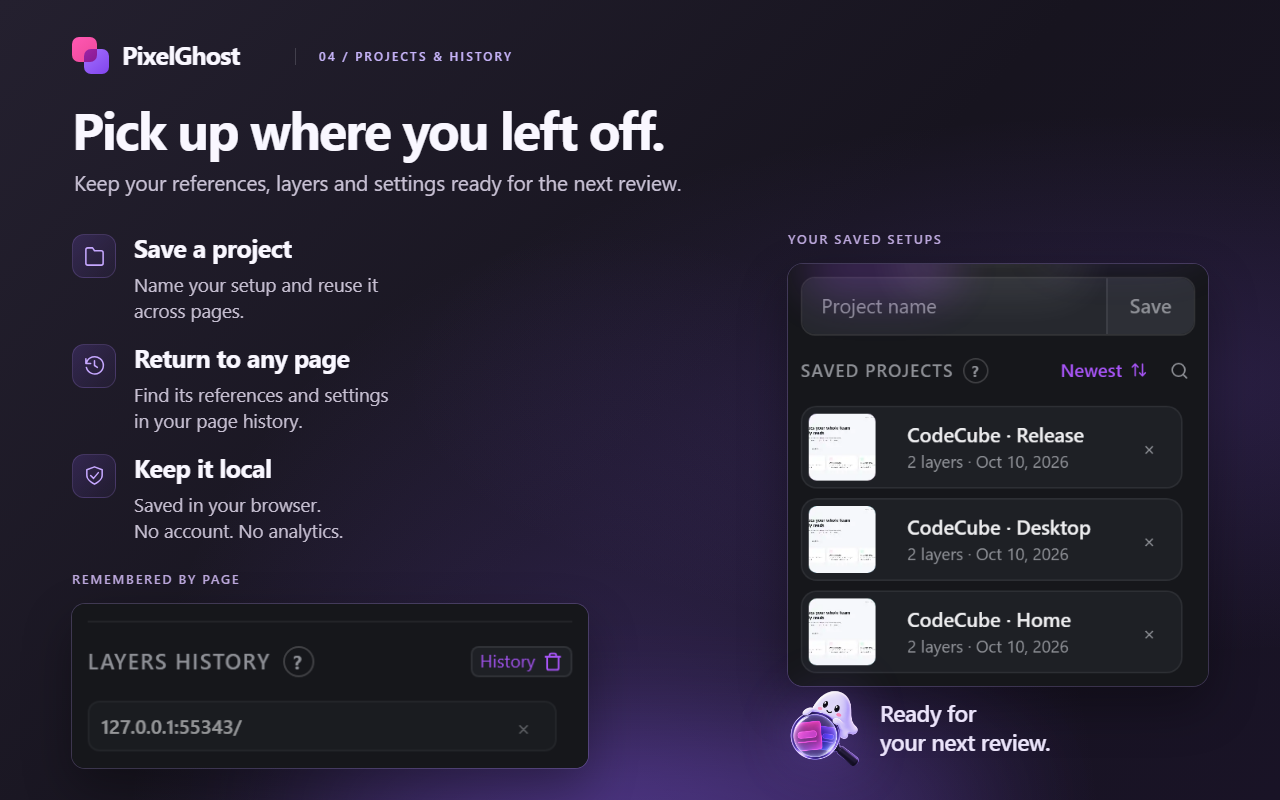
Save named projects and restore references and settings for each saved page URL. Keep working from the floating widget with the popup closed. Page tools also work without a reference.

  • Named projects you can reuse on another page
  • Layers remembered for each page URL
  • Protect a layer, or a whole page, from deletion
Saved PixelGhost projects and the page layer history.

03 /Free and local

Every feature is free.Your work stays yours.

No account, paid tier or trial. Choose light or dark mode, five accent colors and an interface in eight languages.

Local-first by design.

Workspaces, preferences, captures and score histories stay in your browser profile. No PixelGhost analytics, ads, tracking or uploads to an operator or AI analysis server.

Selected images, fonts, previews and site checks still make web requests. Device frames load the site with its usual browser session. Page scripts may inspect references displayed on that page.

Read the privacy policy
IndexedDB
URL-keyed workspaces, images and named projects, the last twelve screenshots, a Steps walkthrough in progress, and up to twenty SEO deep-scan results per page.
Local storage
Consent, display and tool preferences, recent colors, selector rules and custom devices.
Recordings
Saved to your device and not retained in the extension.
Clipboard
Read access is optional and requested only when you select Paste. Ordinary Ctrl+V paste works without it.

04 /Keyboard shortcuts

Hands on the keys.

Use Ctrl on Windows and Linux, Command on macOS. Change the widget binding in your browser’s extension shortcut settings.

Keyboard shortcuts
KeysActionWhen
AltShiftGShow or hide the widget and overlaysBrowser command
Hold\Hide the reference temporarilyWidget and overlay visible
← ↑ → ↓Nudge by 1 pixel; add Shift for 10Widget and overlay visible
Ctrl/CmdVAdd a copied imagePopup, or page with the widget visible, outside editable fields
AltShiftCStart the screen eyedropperColor Picker open
AltShift1 2 3Select an area, capture the visible page, capture the full pageScreenshot open
The complete shortcut table

06 /Get PixelGhost

Free on the Chrome Web Store

Ready for yournext review?

Add it to Chrome, open the page you are reviewing and press Alt+Shift+G. Questions, privacy requests and support: codecube99@gmail.com

Next product · EVERYDAY UTILITYYouScroll — Keep watching. Keep exploring.